 EditableImage
Convert a diagram image into editable Draw.io nodes and connectors.
The shapes come back attached to their arrows, so you can drag a box and the lines follow it — then keep working in the Draw.io editor you already know.
New accounts get 10 free credits — no card.
One run costs 4 credits, so that covers your first 2. Signing in is free and takes one click — the tools need an account to run.
Every new run is charged, including the same image uploaded again. Extra steps you ask for — another edit round, a further split — cost extra; a failed run refunds. See credit packs and pricing.
Image to Draw.ioDraw.io XML
- Upload the diagram image.
- Nodes, labels, and connectors are recovered, with each arrow attached to the shapes it joins.
- Edit in the embedded Draw.io canvas and export .drawio XML.
Image to Draw.io at a glance
Image to Draw.io by EditableImage: Upload a PNG, JPG, screenshot, or flowchart image and recover editable Draw.io nodes, labels, and connected arrows in a standard .drawio file.
- Input
- PNG, JPG, or WebP, up to 20 MB
- Output
- Draw.io XML
- Best with
- Flowcharts, architecture diagrams, and clean whiteboard exports
- Processing time
- Usually 30–75 seconds
- Cost
- 4 credits per run; new accounts get 10 free credits, no card
- Your upload
- Never published; the server copy is deleted after 24 hours
- Last updated
- 21 October 2026
Compare the image with the editable Draw.io diagram
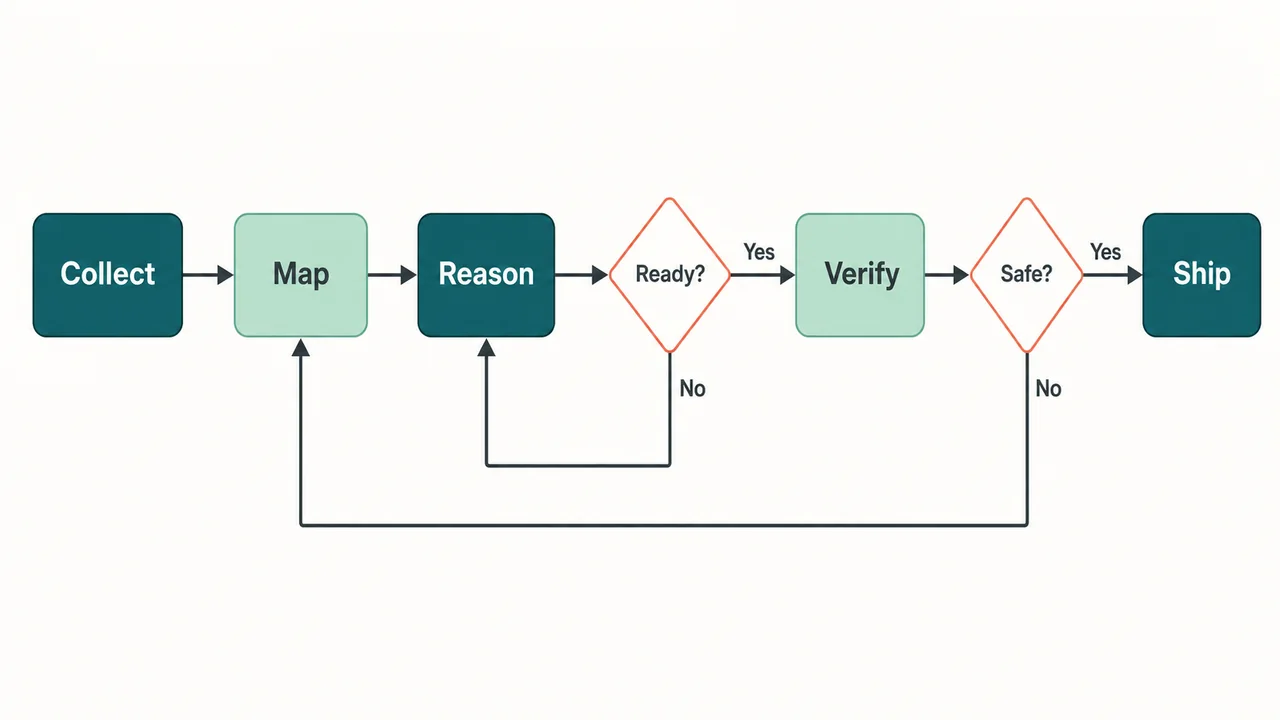
How image-to-Draw.io conversion works
- 01Upload the diagram image.
- 02Nodes, labels, and connectors are recovered, with each arrow attached to the shapes it joins.
- 03Edit in the embedded Draw.io canvas and export .drawio XML.
When to convert an image to Draw.io
- An architecture diagram from a slide deck or a PDF.
- A flowchart you need to extend but only have as a screenshot.
- A whiteboard photo you want as a real editable diagram.
Image to Draw.io questions
The real Draw.io editor, embedded on the page. Styling, alignment, and grouping all work as they normally do.
Where the recovery could tell which shapes an arrow joins, yes — the connector is bound to them, so moving a node reroutes the line.
Yes. Use a full-resolution capture with legible labels and complete arrowheads. Check the recovered connections in Draw.io before exporting, especially where lines cross.
It is standard .drawio XML. Open it in Draw.io, diagrams.net, or any tool that reads mxGraph files.
Crossings and faint arrowheads are where recovery is least sure — a crossing can be read as a junction, and a blurred arrowhead as a plain line. Check those spots in the embedded editor and reattach any connector that came loose before exporting.
A conversion is 4 credits for the picture, however many calls it took, and a failed run refunds in full. The result stays reachable from your account page for 24 hours and reopens free for further editing.
Start free — signing in gives you 10 credits
No card required. Enough for 2 diagram conversions, before you decide whether any of this is worth paying for.
- Signing in takes one click and costs nothing. The tools need an account to run.
More image-to-Draw.io workflows
- Turn a whiteboard photo into an editable diagram.
Photograph a whiteboard diagram, recover editable shapes and connectors where the photo is clear, then correct labels and links in Draw.io.
- Convert a hand-drawn flowchart to a digital one.
Convert a paper or tablet flowchart into editable Draw.io shapes and connectors, with guidance for photographing and checking a hand-drawn source.
Image to Draw.io guides
- When your architecture diagram only exists as a picture
A whiteboard photo, a screenshot, a PNG in the wiki — often the only copy of a diagram is an image. What recovering it got right, and what it missed.